Posts

Login Page Template | Quiz Application part-12 | asp.net mvc Project

Html: @{     Layout = null; } <link href="//maxcdn.bootstrapcdn.com/bootstrap/4.1.1/css/bootstrap.min.css" rel="stylesheet" id="bootstrap-css"> <script src="//maxcdn.bootstrapcdn.com/bootstrap/4.1.1/js/bootstrap.min.js"></script> <script src="//cdnjs.cloudflare.com/ajax/libs/jquery/3.2.1/jquery.min.js"></script> <!------ Include the above in your HEAD tag ----------> <!DOCTYPE html> <html> <head>     <title>My Awesome Login Page</title>     <link rel="stylesheet" href="https://stackpath.bootstrapcdn.com/bootstrap/4.1.3/css/bootstrap.min.css" integrity="sha384-MCw98/SFnGE8fJT3GXwEOngsV7Zt27NXFoaoApmYm81iuXoPkFOJwJ8ERdknLPMO" crossorigin="anonymous">     <script src="https://ajax.googleapis.com/ajax/libs/jquery/3.3.1/jquery.min.js"></script>     <link rel="stylesheet" href="https://use.fon...

Admin Panel Dashboard Template | Quiz Application part-11 | asp.net mvc Project

Html: <link href="//maxcdn.bootstrapcdn.com/bootstrap/3.3.0/css/bootstrap.min.css" rel="stylesheet" id="bootstrap-css"> <script src="//maxcdn.bootstrapcdn.com/bootstrap/3.3.0/js/bootstrap.min.js"></script> <script src="//code.jquery.com/jquery-1.11.1.min.js"></script> <!------ Include the above in your HEAD tag ----------> <link href="https://maxcdn.bootstrapcdn.com/font-awesome/4.6.3/css/font-awesome.min.css" rel="stylesheet" integrity="sha384-T8Gy5hrqNKT+hzMclPo118YTQO6cYprQmhrYwIiQ/3axmI1hQomh7Ud2hPOy8SP1" crossorigin="anonymous"> <body class="home">     <div class="container-fluid display-table">         <div class="row display-table-row">             <div class="col-md-2 col-sm-1 hidden-xs display-table-cell v-align box" id="navigation">                 <div class="logo...

How To Upload Large File using postman |Web API to upload Large files |Tutorial in Urdu & English

Video Link:  https://www.youtube.com/watch?v=yhz8DiPa7HU Copy this code in your Controller :  -------------------------------------------------------------------------------------------------------- [HttpPost]         public async Task<bool> Upload()         {             try             {                 var fileuploadPath = ConfigurationManager.AppSettings["UploadFile"];                 var provider = new MultipartFormDataStreamProvider(fileuploadPath);                 var content = new StreamContent(HttpContext.Current.Request.GetBufferlessInputStream(true));                 foreach (var header in Request.Content.Headers)                 {          ...

Shopping Cart Source Code asp.net mvc C#

Image
Click Here to Download the Source Code

Source Code of E-Marketing website asp.net mvc Project C#, SQL SERVER

Image
Click Here to download the Source Code

20-Integrate Asp net Core Mvc with React js | React integration for ASP.NET Core MVC | Part-20

Image
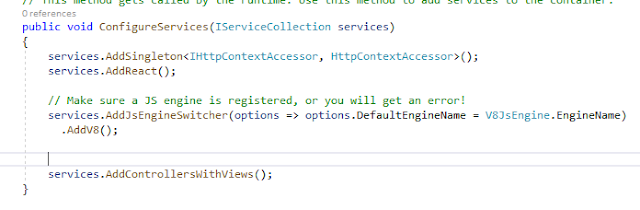
Hello & As- salam  u  alikum  ! In this Article we will learn to Integrate Asp.net core application with REACT JS Step#  1:     Create an asp.net core mvc application in visual studio 2019 with .net core 3.5, then goto the manage nuget package and install these packages. JavaScriptEngineSwitcher.V8  React.AspNet Step#  2:     Go to the startup.cs & add these following  namespaces. using Microsoft.AspNetCore.Http; using JavaScriptEngineSwitcher.V8; using JavaScriptEngineSwitcher.Extensions.MsDependencyInjection; using React.AspNet; Step#  3:     Add  following line of code in  ConfigureServices() method      ---------------------------------------------------------------------------- services.AddSingleton<IHttpContextAccessor, HttpContextAccessor>();             services.AddReact();         ...

Reat State| Maintaining State in React js | Adding New Records in Json Object

Hello & As- salam  u  alikum  ! This is the 3rd article related to React js , In this blog we will discuss about the State in React js which is the backbone of react applications, Lets do it! In the previous article, we had discuss about the functional and class components, now we will use a class component to display records from current state and we will add new records in the json object or state of the component. Below is the complete code for your application, I explain all these line of code  partially. import   React , {  Component  }  from   "react" ; class   App   extends   React . Component  {    constructor () {      super ();      this . state  = {        data:  [         {          ...